AI Video Generator: 3D AI Mix
- 3.5
- Rating
- 5.00M
- Installs
- Free
- Price

 Analysis by App-foxy
I approached AI Video Generator: 3D AI Mix as a practical creative tool rather than a magic button for instant social success. It sits in the Art & Design category and is built around turning written ideas and images into short AI-assisted videos with stylized effects and three-dimensional looks. That makes it immediately appealing if you want visual content without learning a full editing suite, but it also means the important question is not simply whether the results look impressive. It is whether the app gives you enough control to use those results responsibly and comfortably.
My overall impression is mixed in a useful way. The concept is accessible, the workflow is aimed at quick experimentation, and the app can help a rough idea become something shareable. At the same time, AI-generated video is unpredictable by nature. A prompt may produce an attractive mood while missing the exact subject, movement, or message you had in mind. I would recommend it to curious creators, social media users, and beginners who enjoy trying several visual directions. I would be more cautious about recommending it for professional work where consistent characters, precise timing, or detailed privacy controls are essential.
What the app is really useful for
AI Tech Labs presents this as a free app, and that makes it easy to test without committing money at the start. The app is rated for Everyone, so its basic positioning is broad rather than aimed at a specialist audience. It has passed the million-install mark, while its average rating is around 3.9, which suggests a sizeable audience but also a range of experiences. I would read that combination as a reason to explore it with realistic expectations instead of assuming every generated clip will be polished.
You May Also Like

 Blood Strike: 2.5 Anniversary
Blood Strike’s Loadouts Turn Every Drop Into a Tactical Gamble
A close look at Blood Strike’s custom loadouts: how fast access to signature weapons reshapes its battle royale rhythm, rewards preparation, and narrows the gap between fights.

 Pandora - Music & Podcasts
Pandora’s Music Is Easy to Start, but Harder to Recover
Pandora’s strength is its low-effort path from a seed to a station. Its weak spot is how much confidence it asks you to place in connection, setup, and quiet recovery.

 8 Ball Pool
 Is Built on Rivalries, Rematches, and Routine
A close look at the rivalries, rematches, shared routines, and unanswered safety questions that turn a quick pool match into a persistent mobile community.

 Samsung Music
’s Quiet Strength Is Playing What You Already Own
Its reach comes less from spectacle than from dependable access to a personal library. That simplicity is both the app’s strongest retention engine and its ceiling.

 AccuWeather: Weather Radar
AccuWeather Review: A Quick, Clear Forecast for Everyday Decisions
For everyday plans, the best forecast is the one you can understand quickly. AccuWeather makes rain timing, radar, and local conditions easy to act on, with a few trade-offs.

 Hill Climb Racing
Why Hill Climb Racing Still Turns Crashes Into One More Run
A tiny car, a bumpy hill and one more upgrade: Hill Climb Racing keeps resurfacing because its simple chaos makes every near-miss feel personal.
More From Our News Desk



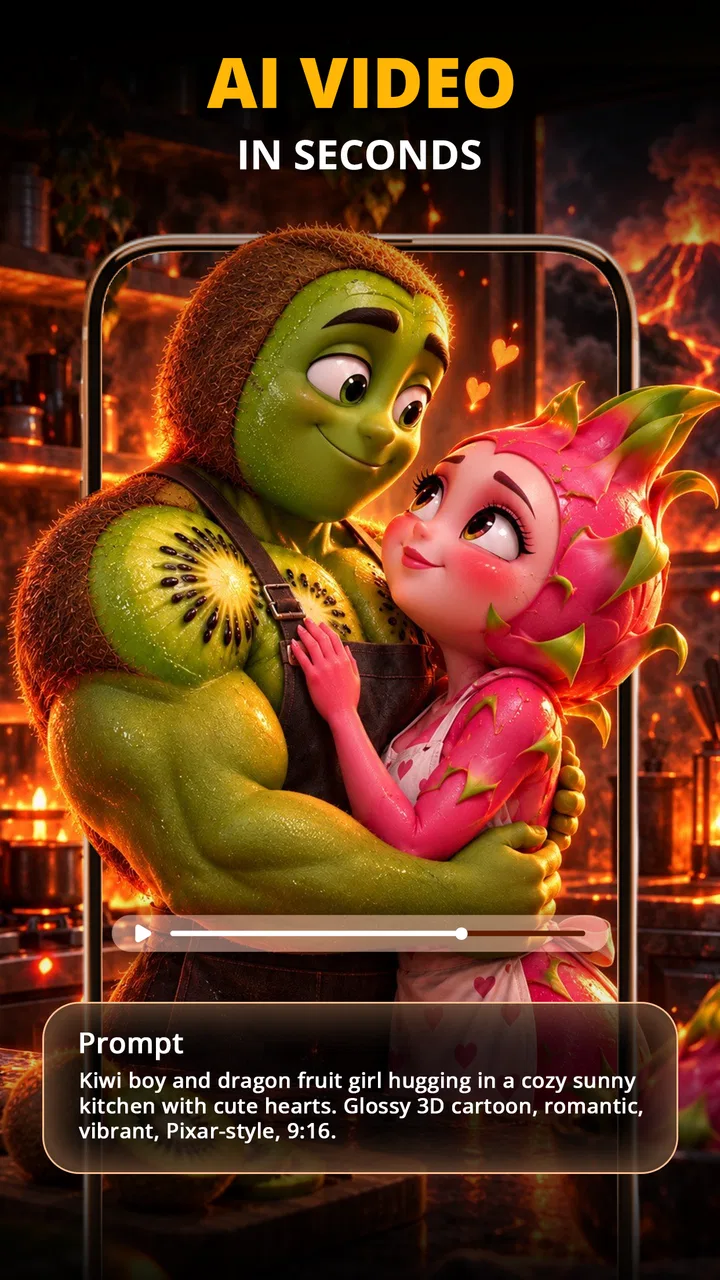
The central appeal is the combination of text and images. Text gives you a way to describe a scene or visual direction, while an image can provide a starting point for the transformation. In practice, that is more useful than relying on one method alone. A written prompt can establish atmosphere, movement, and style; an image can anchor the subject. If the result feels too generic, I would revise the wording rather than immediately blaming the visual engine. Small changes such as specifying the camera feeling, the subject’s position, or the intended mood can make an experiment easier to judge.
One everyday use case is preparing a quick announcement for a club, small business, school project, or personal event. I could begin with a simple product or event image, create a short animated treatment, and then compare several styles before choosing one for a social post. This is not the same as producing a complete campaign. It is closer to creating a visual starting point that would otherwise take more time in a conventional editor.
The 3D styling is particularly suited to ideas that benefit from a noticeable visual transformation. A plain image can become more eye-catching when the treatment adds depth, motion, or a dramatic presentation. However, I would avoid using a strong effect merely because it is available. If the message depends on reading small text or recognizing a product accurately, an intense style can work against clarity. The best result is not always the most complicated one.
Where the workflow feels beginner-friendly
The app’s strongest practical quality is its low barrier to entry. You do not need to understand timelines, keyframes, masks, or compositing before trying to make something. That matters for someone who has an idea but does not want to spend an evening learning a traditional editor. The text-led approach also makes experimentation feel less technical: describe what you want, provide an image when useful, and inspect the result.
I found that this kind of workflow works best when I treat every generation as a draft. Instead of expecting the first attempt to be final, I would create a small set of variations with one meaningful change at a time. For example, I might keep the subject and mood fixed while changing the visual style, then keep the style and change the framing. This makes it easier to understand which choice improved the result.
A less obvious advantage is that the app can help with visual brainstorming even when I do not use the output directly. A generated clip may reveal a direction I had not considered, such as a more playful presentation for a static image or a stronger mood for a short concept. In that role, it competes less with a professional editor and more with the blank page. That is a worthwhile use, especially for people who struggle to decide how to begin.
There is also a practical trade-off between speed and repeatability. A quick AI workflow can produce an interesting result faster than manual editing, but manual editing usually gives better control over exact transitions, timing, typography, and brand consistency. If you need a video to match an established visual identity frame by frame, I would use this app for ideas or background material and finish the work elsewhere.
How I would write prompts and choose images
Vague prompts are tempting because they are quick, but they often leave too many creative decisions to the generator. I would describe the main subject first, then the action, visual mood, and intended presentation. A useful prompt structure is: what is visible, what should move, what feeling should dominate, and what should remain recognizable. This does not guarantee a perfect result, but it gives the app a clearer brief.
Image choice matters just as much. A clean image with one obvious subject is usually easier to evaluate than a busy picture containing several people, signs, or competing objects. If I were animating a product, I would start with a well-lit image where the product is not partly hidden. If I were using a personal photograph, I would first consider whether every visible person would be comfortable with it being processed and turned into a video.
One useful workflow is to separate the creative test from the publishing decision. I would first generate a version to see whether the movement and style work. Then I would inspect it for distorted details, unintended emphasis, or anything that changes the meaning of the original image. Only after that review would I consider sharing it. This extra pause is especially important when the source image includes a face, a child, a private location, or information visible in the background.
I would also keep the original image untouched and save a separate copy for experimentation. That is a simple habit, but it prevents an AI transformation from becoming the only version of an important photograph. It also makes comparison easier when deciding whether the generated treatment genuinely improves the idea.
Trust, controls, and moments that deserve care
I pay attention to the choices an app gives me at the moments when a creative experiment could become a privacy or spending decision. Here, I would make a habit of reviewing the selected image, prompt, and purchase details before proceeding, rather than letting a promising preview rush me along. That small pause makes it easier to keep experimentation intentional, especially when a project moves from a private draft toward sharing.
What I can responsibly judge from the app experience
Trust in an AI creative app comes from more than attractive output. I want to know what I am being asked to provide, when a choice is optional, and whether I can make a decision before committing to a generation or purchase. With this app, I would pay close attention to the visible screens around image selection, text entry, account access, and any permission request. I would not treat a polished interface as proof of a particular data practice, and I would not assume that a free download means every part of the service is unlimited.
The developer is AI Tech Labs, and the current version is 1.3.0. Those details are useful when checking that I am evaluating the intended app and not an imitation with a similar name. The minimum operating system is Android 7.0, which keeps the app accessible to many older devices, although the actual comfort of AI video creation can still depend on the phone’s performance, storage, and connection quality.
The app includes optional purchases ranging from about five dollars to nearly thirty-seven dollars per item. That is the point where I would slow down and read each purchase screen carefully. I would check what the item unlocks, whether the wording makes the purchase a one-time choice, and whether the app clearly shows the amount before confirmation. I would not spend simply because a generation is exciting; I would first decide whether the result is good enough to justify the cost.
For parents or anyone sharing a device, the Everyone age rating is reassuring as a broad content classification, but it should not replace supervision around images and payments. A young user may understand how to describe a scene without understanding the implications of uploading a personal photograph or confirming an in-app purchase. I would keep those decisions with the device owner.
Data-sensitive moments in a creative workflow
The most sensitive moment is not the final export. It is the moment I choose an image and submit it for processing. A photograph can contain more than the subject I intend to animate: faces in the background, house numbers, documents, school uniforms, screens, or recognizable locations. Before using it, I would crop or replace anything unnecessary. That habit protects privacy without reducing the creative value of the app.
I would be especially careful with images belonging to someone else. Having access to a photograph does not automatically mean I have permission to transform or publish it. This matters for family pictures, customer images, workplace material, and photographs taken at private events. The app makes visual experimentation easy, but responsibility for the source image remains with me.
Text prompts can also contain sensitive information. I would avoid entering names, contact details, private conversations, medical information, or confidential project descriptions when a general phrase would work just as well. For a business concept, I could describe the visual mood and product category without including internal launch plans. For a personal project, I could use a fictional label instead of a real person’s full identity.
Another data-sensitive issue is the difference between creating and sharing. A video may look harmless inside the app but reveal a private context once posted publicly. I would inspect the entire frame, not just the central subject, and check whether the generated motion introduces details that were easy to miss in the still image. This is one reason I prefer a review step before downloading or publishing any result.
User agency matters more than the visual effect
I judge an AI tool by how well it lets me reject, revise, and stop. The most useful form of control is not necessarily a large settings menu; it is a clear path to change my mind. When I try an effect, I want to be able to compare it with the original image, revise the idea, and decide whether the result is worth keeping. If the app pushes me toward immediate sharing or a purchase before I have assessed the output, that would weaken my confidence.
My advice is to keep a small working routine: prepare a non-sensitive source image, write a focused prompt, review the generated clip at full size, and only then decide whether to save or share it. I would also keep track of which version I prefer rather than generating endlessly. AI tools can encourage trial-and-error spending, particularly when each new variation feels as if it might be the perfect one.
For creators who need exact control, the usual alternatives remain stronger. A conventional mobile editor is better for trimming a clip to a precise length, placing text at an exact moment, balancing audio, or maintaining consistent branding. A desktop editor is better for layered projects and detailed corrections. AI Video Generator: 3D AI Mix is more attractive when the goal is rapid visual exploration, a stylized transformation, or a starting point for a short social video.
That distinction answers an important practical question: should this replace a normal video editor? In my view, no. It can complement one, especially when I need a concept quickly or want to animate a still image in a way that would be tedious manually. But if the project depends on predictable results and detailed editing decisions, I would choose the conventional tool first and use AI only where it genuinely saves time.
Who should try it, and who should skip it
I would suggest trying it if you enjoy visual experimentation, want to turn a written idea into a quick clip, or need a simple way to explore 3D-inspired treatments without learning advanced software. It is also a reasonable option for a casual creator who values speed more than perfect consistency. The free entry point makes a cautious test possible, provided I pay attention to purchase prompts and avoid using sensitive source material.
I would skip it if I need dependable character continuity, exact product representation, detailed audio editing, or a tightly controlled production process. I would also avoid making it the main tool for confidential work unless I had personally reviewed the app’s current privacy information and felt comfortable with the choices presented during use. The right decision depends less on whether AI video is fashionable and more on how much control the project requires.
One final practical tip is to judge the app on a small, low-risk project before building a larger workflow around it. Use an image created for testing, write a prompt that does not reveal private information, and see how comfortably you can review the result and handle any purchase decision. That test tells me more than a single impressive sample because it measures the parts that affect everyday use: clarity, control, and willingness to let the user decide.
After spending time with the app’s concept and workflow, I see it as a convenient creative sketchbook with a strong visual hook, not a complete production studio. The 3D effects can make ordinary source material feel fresh, and the text-plus-image approach lowers the starting barrier. Its limitations appear when I need accuracy, repeatability, or deeper editing control.
My cautious verdict is that AI Video Generator: 3D AI Mix is worth exploring for personal experiments and quick concept videos, particularly if I treat every output as a draft and every uploaded image as a deliberate choice. I would keep private or sensitive material out of the workflow unless I had reviewed the app’s visible data and account controls for myself. Used with that level of care, it can be a fun and useful addition to a mobile creative toolkit; used as an automatic replacement for thoughtful editing, it is likely to disappoint.
FAQs for AI Video Generator: 3D AI Mix
01What features does AI Video Generator: 3D AI Mix offer?
AI Video Generator: 3D AI Mix provides users with advanced tools to create stunning 3D animations and videos. It includes AI-driven effects, customizable templates, and real-time rendering capabilities. The app also supports multiple file formats for export and offers a user-friendly interface for both beginners and professionals.
02Is AI Video Generator: 3D AI Mix suitable for beginners?
Yes, AI Video Generator: 3D AI Mix is designed to be accessible for users of all skill levels. It includes an intuitive interface and step-by-step tutorials that help beginners create high-quality videos with minimal effort. The app’s AI-enhanced features simplify complex processes, making it easier for newcomers to generate professional-looking content.
03How does AI Video Generator: 3D AI Mix utilize AI technology?
The app leverages AI technology to automate and enhance video creation processes. It uses AI algorithms to apply sophisticated effects, optimize rendering, and offer motion tracking. This technology allows users to effortlessly incorporate complex animations and achieve impressive results without needing extensive technical knowledge.
04What are the system requirements for AI Video Generator: 3D AI Mix?
AI Video Generator: 3D AI Mix is compatible with both Android and iOS devices. It requires a minimum of 4 GB RAM and supports devices running on Android 8.0 or iOS 12 and above. For optimal performance, a device with a powerful processor and ample storage is recommended to handle the app’s advanced features.
05Are there any in-app purchases or subscriptions in AI Video Generator: 3D AI Mix?
Yes, AI Video Generator: 3D AI Mix offers in-app purchases and subscription options. While the basic features are free, premium content such as exclusive templates, advanced effects, and higher resolution exports require a subscription. Users can choose from monthly or annual plans to unlock these additional features.
Pros
- Intuitive interface for easy navigation.
- Wide range of 3D effects available.
- Quick rendering of videos.
- Integration with social media platforms.
- High-quality output resolution.
Cons
- Limited free version features.
- Occasional app crashes.
- Requires a stable internet connection.
- Some features are in-app purchases.
- Large file size may consume storage.

AI Video Generator: 3D AI Mix
Gallery